Note: Access to Tax Reporter (transaction PU19) was suspended on 1/6/26 at 8 pm to prevent conflicts during statewide W-2 processing.
W-2 production runs were executed with the following dates:
Reporting Period End Date: 12/31/2025
Consider Payroll Results up to: 1/9/2026
Manual adjustments
All manual adjustments completed on 1/6/26 at 8 pm are included on the W-2s for 2025.
When reviewing log manager results for W-2s and 941s, watch for employee adjustments with the message "Manual Adjustments Ignored." If you encounter this message, contact the OFM Help Desk for assistance. Any further manual adjustments may require Forms W-2C/W-3C.
To provide agencies additional access to the PDF files created during 2025 year-end processing, we have extended spool retention until the end of January. Agencies will be able to review and download year-end PDF files until 1/31/26.
W-2’s will be distributed to employees by Consolidated Mail Services. Employee W-2s are also available in MyPortal.
Downloading PDF Spools from SP01 (Output Controller)
To download spools created during the 2025 Year End Process:
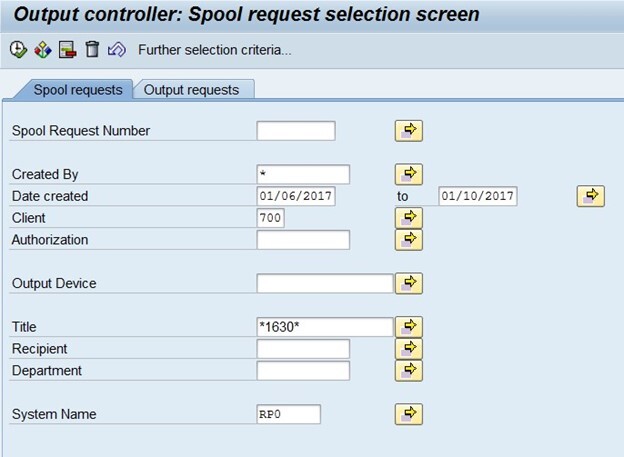
1. Go to transaction SP01 and enter the following criteria:
Created By: enter an asterisk – example: *
Date created: enter 01/07/2026 to 01/09/2026
Title: enter asterisk, your agency Personnel Area, asterisk – example *1050*
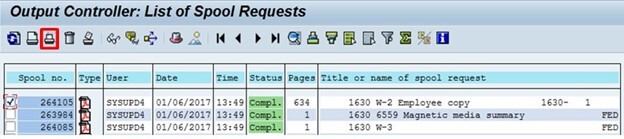
2. Select the execute button.
3. Double click the PDF icon to open the file.
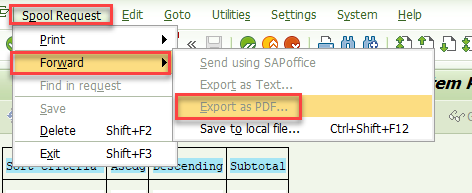
4. Once the file is open, select Spool Request > Forward > Export as PDF.
5. It will take a moment for the file to build then you will be able to save your file.
Additional information:
This communication was sent to OFM GovDelivery HRMS Communications topic